
Tools / Stacking
Toolbar tool
Stacking
Turn a folder of raw sub-exposures into one clean master — graded, aligned, and integrated. No separate stacking app needed.
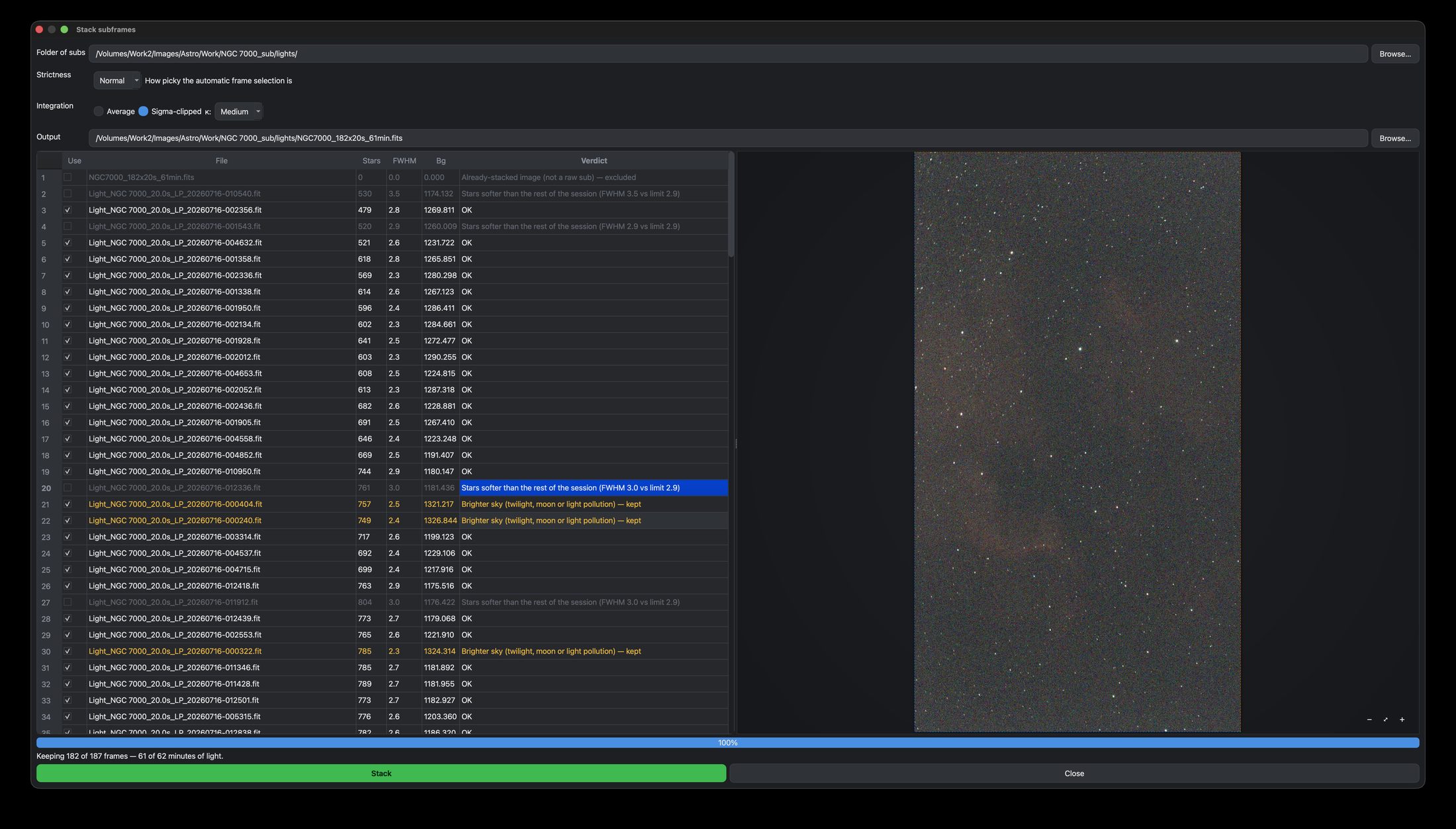
What it does
Turns a folder of individual sub-exposures into a single clean master. It grades every frame — measuring star count, sharpness (FWHM) and background — and flags the ones hurt by cloud, wind or soft focus. It rejects the duds, registers (aligns) the rest — handling the field rotation an alt-az mount like the Seestar introduces — and integrates them into one image.
How to use it
- Click Stack in the toolbar and choose your folder of subs.
- Pick a Strictness (Relaxed / Normal / Strict) — how picky the automatic frame selection is.
- Choose an Integration method: Average, or Sigma-clipped (with a κ of Low / Medium / High) to reject satellites, planes and hot pixels.
- Let it grade, review the table — rejects are flagged, and you can override any frame by hand — then Stack. The finished master loads straight into the editor.
If you already have a stacked master — from the Seestar app, say — you can skip stacking entirely and just Open FITS.
When you do not need this toolTips
More subs mean a cleaner master with less noise. Sigma-clipped integration is the safe default — it rejects the odd satellite trail automatically.